How to Show Local SEO Results to Clients: The Monthly Report Walkthrough
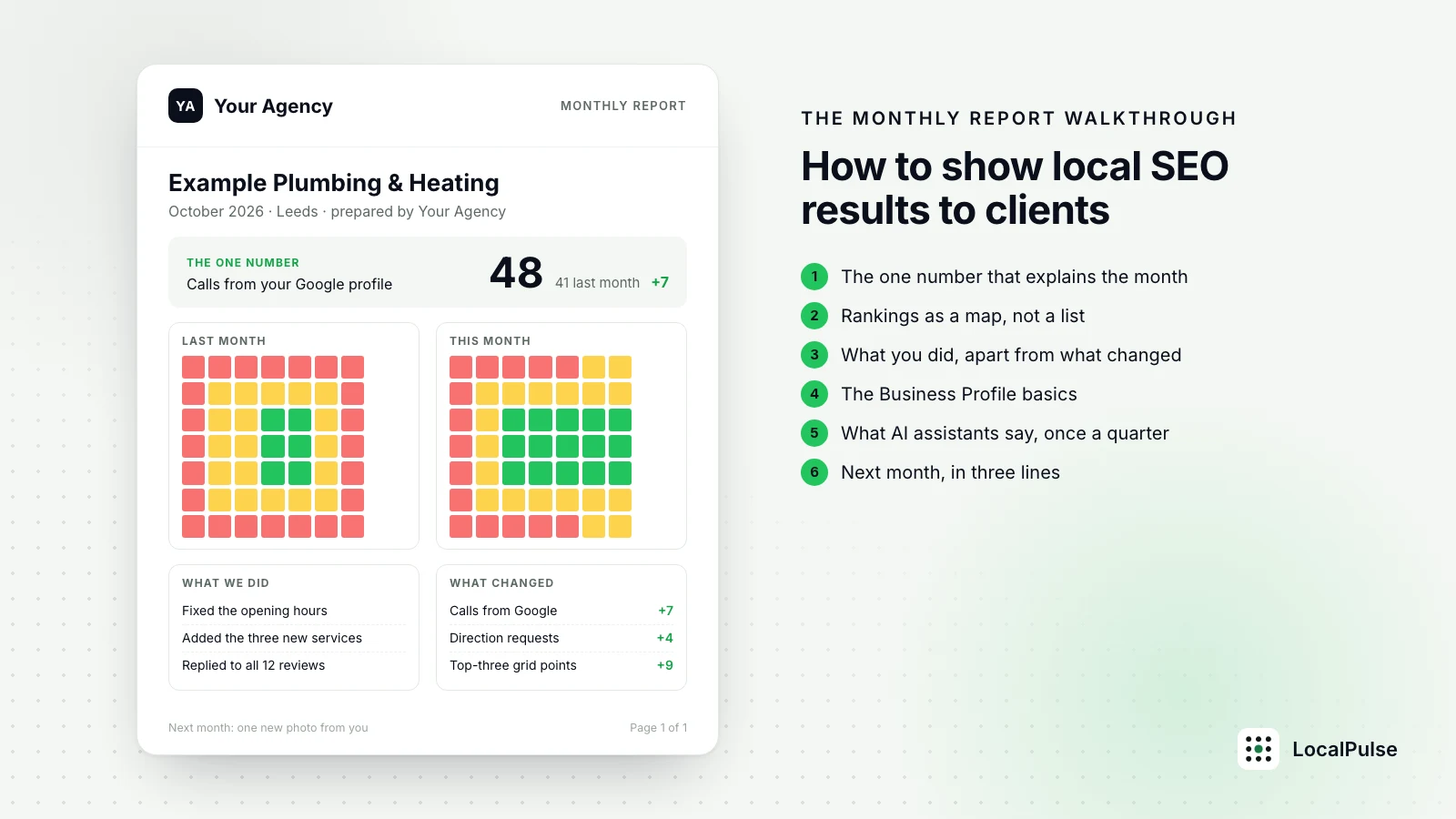
A client does not cancel because the rankings dropped. They cancel because they did not understand the report. If the person opening your monthly email is a dentist, a plumber or a letting agent, the report has one job: to let them see, in under a minute, whether the phone is more likely to ring this month than last. Everything else is supporting evidence.
This is a walkthrough of a local SEO report, in the order the client reads it.
1. Open with the one number that explains the month
Not twelve metrics. One. For most local businesses that number is calls and direction requests from the Business Profile, taken from the Performance tab, compared with the same month last year if you have it and with last month if you do not. Put it in the first line of the email and the first line of the report, with the change in plain words: "Calls from your Google profile: 48 this month, 41 last month."
If that number went down, say so in the same sentence and say why in the next one. A client who reads "calls down 15 percent because the new ads above the map pack took the clicks, here is what we are doing about it" trusts you more than one who has to find the drop in a chart on page four.
2. Show rankings as a map, not a list
A rank on Google Maps is not a single number. Someone searching "emergency plumber" two streets from the shop sees a different result from someone searching the same words across town. A list that says "position 3" hides this, and the client finds out the hard way when their brother-in-law searches from his house and finds the competition.
Show the ranking from a grid of points around the business instead: a map with a number on each point, green where the business is in the top three, amber for four to ten, red beyond. Two maps side by side, last month and this month, make the change visible without a word of explanation. If you cannot produce a grid, at least state where the search was made from and keep it the same every month.
Write one line under the map on what moved and why: "Green spread east along the high street after the new reviews and the opening hours fix. Still red around the station, where two competitors have more reviews."
3. Separate what you did from what changed
Clients mix up activity and results, and so do reports. Keep two short lists:
- What we did this month: five bullets at most, in plain words. "Fixed the wrong opening hours on the profile. Added the three new services. Replied to all twelve reviews. Published the page for boiler repairs in Didsbury."
- What changed: the numbers from sections one and two, with the direction and the likely cause.
Never claim a result from an action you cannot connect. "Calls went up after we published the boiler page" is a claim; "calls went up; the boiler page got its first clicks" is honest and still useful.
4. Include the Business Profile basics every month
Reviews (count and average, and how many were answered), photos added, posts published, categories and services as they stand, and anything Google changed or flagged. The client rarely reads this section, but it is the one that saves you when a profile gets suspended or an edit appears from nowhere: you have the record.
5. Add what AI assistants say, once a quarter
More clients now ask "does ChatGPT recommend us?" The honest answer most months is "it names three businesses for your search and you are not one of them yet, here is who it names and why". Check ChatGPT, Claude, Perplexity and Google's AI Overviews for the client's main search and town, note which businesses they name and which sources they cite, and show it as a short table. Do not promise to change it quickly; show it, so the client sees you looking at the next thing before they ask.
6. End with next month, in three lines
What you will do, what you expect it to move, and what you need from the client (a photo, a reply to a review, an answer about a new service). Clients who are asked for one small thing each month stay engaged; clients who get a document with no ask forget you exist until the invoice.
What to leave out
Impressions, average position across all keywords, domain authority, bounce rate and anything with "sessions" in it. If a number cannot be explained to the client in one sentence that mentions their business, it belongs in your own notes, not in the report.
The format
One page, sent as a PDF and as a link, with the client's logo on it, not yours, if you white-label. The email that carries it is three sentences: the one number, the one thing that changed, the one thing you need from them. The report exists so the email is believable.
A monthly report built this way takes an hour per client the first time and twenty minutes after that, because the structure does not change. If you would rather not spend the twenty minutes, this is the report LocalPulse produces every month for each client location, under your own name, from a 49-point Maps grid, the public Business Profile data and the four AI assistants.
Related: local rank tracker · white-label SEO report tool · AI visibility tracker · free Google Maps rank checker

See our local SEO guides more often in Google's Top Stories.