How to set up a Google Business Profile for a client in 2026
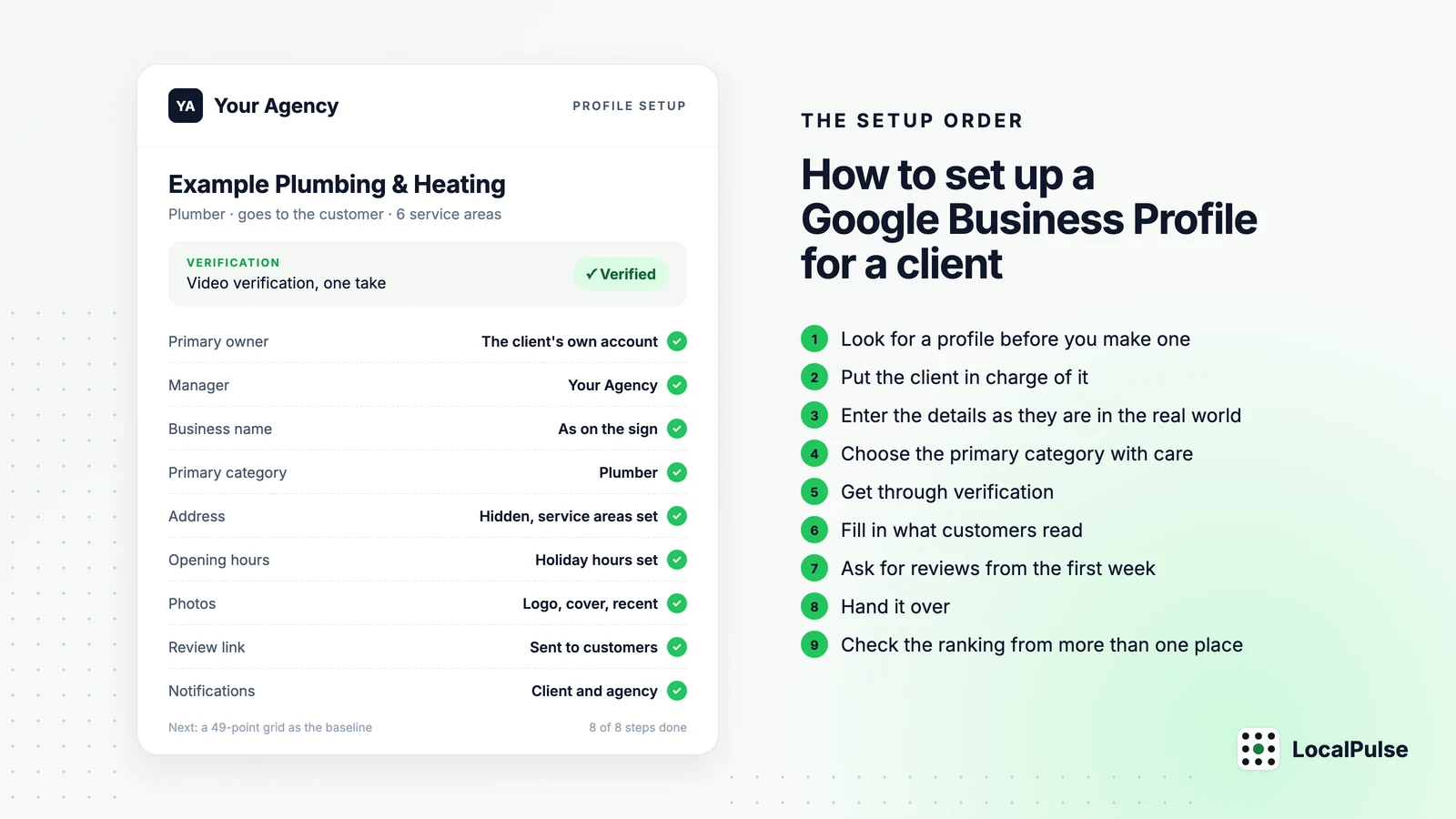
I build LocalPulse, which checks where a business ranks on Google Maps from 49 points around its address, and this is the order I'd follow. Every rule below was checked against Google's own help pages on 9 November 2026, and where a point comes from someone else I've named them.
Look for a profile before you make one
Search Google Maps for the business name and its town, then for the phone number on its own. Google builds profiles from directories and old listings, so a business that's traded for a while often has one already, unclaimed and half right. Claim that one and correct it. Google's guidelines allow one profile per business, and a duplicate is one of the usual routes to a suspension.
If somebody else has already claimed it, a former employee or an old agency, request ownership from the profile itself. Google gives the current owner three days to respond. After that you may be offered the option to claim it, though Google's help page doesn't promise that and may still ask for proof. For a business with no shop or office, one that only travels to its customers, the same page sends you to Google's support instead, with the request "Transfer ownership of listing".
Put the client in charge of it
Google's policy for third parties says the business must "retain ownership or co-ownership" of its profile at all times, and that an agency has to hand control back within seven business days of being asked. So the client's Google account owns the profile, and your agency is added to it as a manager.
Set that up on day one. A newly added owner or manager waits seven days before they can remove other people or transfer primary ownership, so leaving it until the day a client moves on means a week of waiting for everybody.
Then write down who the primary owner is, who the managers are and which inbox gets the notifications. You'll need it if the profile is ever suspended or the person who set it up leaves.
Enter the details as they are in the real world
- Name: what's on the sign and the invoices, with no town or service added. Google's guidelines say the name should reflect the business's real-world name, and extra keywords are the easiest thing for a competitor to report.
- Address: show it only if customers come to the premises. A business that travels to its customers hides the address and sets service areas.
- Service areas: up to 20. List where the business really works. I wouldn't expect them to change rankings. Google's page only says they help people find the profile, Joy Hawkins wrote in Search Engine Land in 2018 that ranking stays anchored on the address used for verification, and Whitespark's write-up from October 2024 agrees. Neither of those is a statement from Google.
- Phone: a number that reaches the business directly.
- Website: the client's own site, with tracking tags on the link, so their analytics can separate profile visits from the rest of Google.
Virtual offices aren't eligible, and neither is a mailbox at a remote location. A coworking space only counts if the business has its own signage there and its own staff on site during opening hours.
Choose the primary category with care
A profile gets one primary category and up to nine more. I think the primary one matters more than any other field, because it decides which searches the business can show up for at all. Google doesn't rank the fields for you, so that's a view. It's a common one: in Darren Shaw's Local Search Ranking Factors survey at Whitespark, published in November 2025, 47 local SEO people scored 187 factors and put the primary category first for the map results, just ahead of how close the business is to the searcher. That's a survey of what experts think, so treat it as informed opinion.
Pick the category that names what the business does most, in the words a customer would use: "Plumber", "Dental clinic". Look at the three businesses on the map for the main search and see which primary category they share. Add others only for services the business really delivers. Google's own advice is to use as few as possible.
Get through verification
Google picks the method and you can't choose it: a phone call or text, an email, a video recording, a live video call, a postcard, or instant verification if the website is already verified in Search Console. The video recording is the one that needs preparing.
Google asks for one continuous, unedited recording of at least 30 seconds, made and uploaded from a phone. Its review takes up to five business days.
For a shop, a clinic or an office, the video shows
- a street sign or a landmark near the premises
- the business name on the signage, matching the profile
- proof that you run the place, such as the till or a staff-only area
For a business that travels to its customers, it shows
- the tools of the trade, or a vehicle with the business name on it
- a permit or an invoice with the business name
- the neighbourhood the business is based in
Keep bank, tax and ID numbers out of the frame, and other people's faces. If Google rejects the video, record a new one with everything from the first plus whatever was missing. Don't create a second profile while you wait.
Get the name, the address and the category right before you verify. Google's help page says a business "might need to verify" again if its name changes after verification, and "must verify" again if it moves to a new address. Its page on categories says the same can happen when you add or edit a category.
Fill in what customers read
Start with the opening hours, including special hours for public holidays. Danny Sullivan, Google's Search Liaison, said in December 2023 that "openness" had become a stronger signal for local searches that aren't for a named business, and he warned against faking hours. So wrong hours can cost visibility as well as a phone call.
Then the description, up to 750 characters in plain words: what the business does, for whom and where. Add the services with a line on each, products with photos if it's a shop, recent photos of the premises, the team and the work, and a booking link if the client takes bookings.
Two parts of older guides no longer apply.
Chat. Google ended the profile's built-in chat on 31 July 2024. A profile can now carry a WhatsApp link or a number that takes texts, in what Google calls "select regions" without naming them. Search Engine Journal reported on 6 November 2026 that the Maps app now shows a Message button beside Call. I'd only add one if a named person answers it during opening hours.
Questions and answers. Google said in December 2025 that it was retiring the public questions and answers section in favour of an "Ask" button in Maps, which answers from what the business and its reviewers have written. Barry Schwartz covered it at Search Engine Roundtable on 15 December 2025. Google hasn't published which countries have lost the section, so look at a live profile in the client's country before you plan around it. Either way I wouldn't spend an hour seeding questions now.
Ask for reviews from the first week
On the profile, press "Read reviews" and then "Get more reviews" to get the review link, and give it to the client in a form they can text to a customer. Google's policy allows asking. It bans offering anything in return, whether that's payment, a discount or a gift, and it bans asking only the happy customers or steering the unhappy ones away. Reply to every review, good or bad.
Hand it over
- The client's account is the primary owner and your agency is a manager.
- Former employees, freelancers and old agencies are removed.
- Notifications for reviews and edits go to an inbox the client reads.
- Somebody looks at the profile once a month.
That last one matters because Google can change a profile on its own. Its help page says it "may update your profile" when users or other sources report the details as wrong, and that it will notify the owner about certain suggested edits before they're published. Search Engine Roundtable reported on 23 September 2026 that owners get four days to accept or reject them. An inbox nobody reads means those four days pass unseen.
If the profile is ever suspended, Google's help page says an appeal can be submitted once. The evidence it lists is the official business registration, a business licence, tax certificates and utility bills, each with the same name and address as the profile. Sterling Sky wrote in January 2024 that the evidence has to be added within 60 minutes of submitting. Google's page doesn't repeat that, so I'd treat it as a practitioner's rule and have the documents ready before starting.
Check the ranking from more than one place
The profile's performance page shows calls, direction requests and website clicks. For ranking, one search from the office tells you about the office. Google ranks a business differently depending on where the person searching is standing, so the same search can put it near the top at its front door and much lower on the other side of the area it serves.
LocalPulse checks the same Google Maps search from 49 points in a grid around the business and draws it as a map. Green is top 3, amber is 4 to 10, orange and red are further down, and grey means it wasn't found. Run it in a new profile's first week and you have a baseline to hold every later month against. It goes to the client as a report under the agency's own logo, for £15 per client location a month, flat, no VAT, which is about $20 or €18.
There's a free rank checker on the site, and the sample report is at localpulse.digitalizer.uk/sample.
See our local SEO guides more often in Google's Top Stories.